Entering Data Fast
CaidentCalc's tables are built to be driven from the keyboard, like the calculation sheets they replace.
Moving around
| Keys | Action |
|---|---|
| Ctrl+↑ ↓ ← → | Move cell-to-cell within the current table (the arriving cell selects its content, ready to overtype). |
| Tab / Shift+Tab | Next / previous input cell — flowing across all the calc tables in order, skipping buttons and disabled cells. |
| Ctrl+1 / 2 / 3 / 4 | Jump to Water Supply / Nodes / Segments / Results. |
Editing rows without the mouse
| Keys | Action |
|---|---|
| Ctrl+A | Insert a row below the current one — nodes get an auto-incremented tag (and the carried elevation); focus lands in the new row, so repeated Ctrl+A walks a whole system in. |
| Ctrl+D | Delete the current row (the supply source is protected). Focus stays put on the row that moves up. |
| Ctrl+Z / Ctrl+Shift+Z | Undo / redo — 50 levels covering everything. |
Accepted input formats
| Field | Formats |
|---|---|
| Elevations & lengths | 13'6" · 5'2.4 · 5-3 · 10' · 2" · 0.5" · plain decimal feet |
| Pressures, flows, K-factors | Plain numbers (digits and a decimal point). |
| Node tags | Up to 10 letters/digits, auto-uppercased. |
| Fitting codes | 3R5T — count then fitting letter; a count of 1 omits the number; max 5 fitting types. |
A cell that can't understand its value tells you — "… is not a valid format for this cell" — and the error bar points at it.
Validation — how errors find you
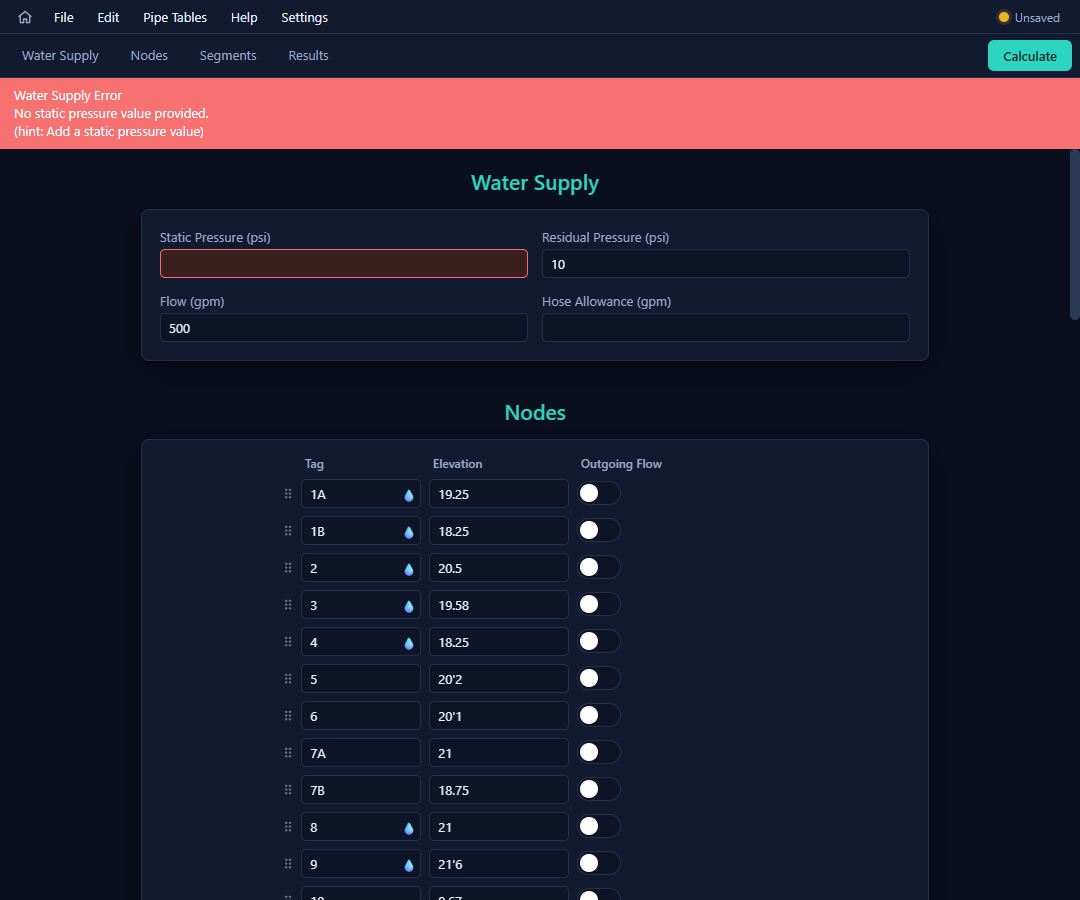
- The error bar at the top of the calc page always shows the most important problem. Click it (or press Ctrl+G) to scroll straight to the offending cell, which is outlined in red.
- While you type, only real-time problems are flagged; the noisy "this is required" checks wait until you press Calculate. After a failed Calculate, all errors stay pinned until each is fixed.
- The checks are thorough: duplicate or unused nodes, references to tags that don't exist, duplicate segments, a segment from a node to itself, out-of-range lengths and diameters, invalid fittings for a material, sprinklers that are also outgoing-flow nodes, pumps or fixed losses that lead to a dead end, and a connectivity check that names any nodes stranded from the supply.
The fastest loop: press Calculate, click the error bar, fix, repeat. Each fix promotes the next problem to the top, and a clean pass goes straight to the solver.